

Speed Analyzer—Easily identify bottlenecks on your website
Test your WordPress website with our Speed Analyzer. A unique, powerful, and all-in-one dashboard solution designed to identify speed-related bottlenecks on your website, compare results (A/B tests are available), and generate a dynamic PDF report.
It is an easy-to-use, one-click solution for identifying and displaying speed-related issues on your WordPress website.
Features include advanced capabilities such as PDF report generation and test scheduling, which let you assess your website’s performance or automate your speed optimization tasks.

Speed Analyzer—The Basics
Speed Analyzer plans
Speed Analyzer comes as a free-to-use plugin.
However, suppose you need more tests (beyond the already generous free daily limit) or want to use it as a speed analyzer and reporting tool for your business, and you’d like to unlock access to external server URL tests.
In that case, you may do so by choosing the appropriate plan below.
FREE
Enough for most users- Server performance test
- Page asset summary with lists
- Performance & Diagnostics (PSI)
- DB Autoloaded options size
- Compare results A/B
- Schedule tests
- PDF report (1/daily)
- Daily limit – 10 tests
- Outside URLs domains test unlocked
- License valid for multiple domains
PRO
If you’d like some more test runs per day- All the previous plus:
- Daily limit – 30 tests
- PDF report (3/daily)
- Outside URLs domains test locked
- License valid for multiple domains
BUSINESS
Even more daily runs and a 2-domain license- All of the previous plus:
- Daily limit – 100 tests
- PDF report (10/daily)
- License valid for 2 domains
- Outside URLs domains test locked
Agency
For agencies and speed optimization professionals- All of the previous plus:
- Daily limit – 700 tests
- PDF report (100/daily)
- License valid for 100 domains
- *Outside URLs domains test unlocked
*Some (web host-specific) tests will not be possible on the outside/external domains.
The companies behind some of the best WordPress speed optimization plugins recommend our services.




If you need a tailored speed analysis
However smart it is, an automated test cannot replace an expert’s tailored speed analysis report. Each report is manually tailored to your unique site architecture and content mix, providing insights and recommendations you won’t find in out-of-the-box tools.

Code Unloader. Improve your website performance.
Check another one of our tools—Code Unloader. Use it to observe all assets loaded to the page and easily unload the bloat. Use Speed Analyzer before and after, and observe your progress.
Gallery images. Colors matter.
Green = good, yellow = ok-ish, red = needs improving. Speed Analyzer is a WordPress optimization tool you can understand at a glance.


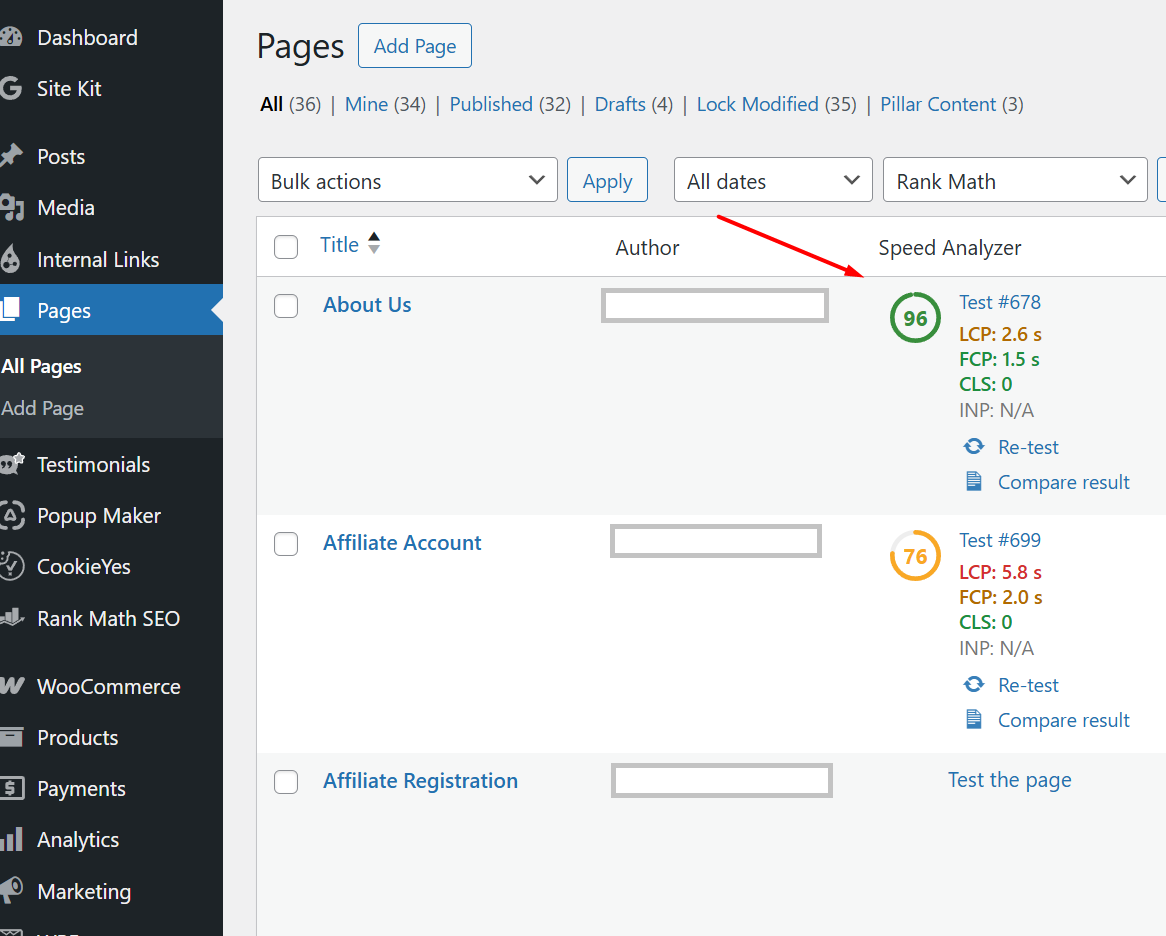

How does the Speed Analyzer work
The Speed Analyzer uses two APIs to obtain the data needed for its calculations.
Speed Analyzer doesn’t stop there—it also extracts relevant information, such as the size of the autoload options, the entire DB size, or the persistent object cache, from the website’s database—something web application speed test tools can’t do.
Combined with the fact that you can run all tests from a single location (dashboard) with just one click, the Speed Analyzer is a unique and indispensable tool. Presented in a clear, color-coded, and easy-to-understand way.
It certainly doesn’t hurt that regular WP users can use it for free!
If you’d like, you can experiment with the Compare Results functionality.
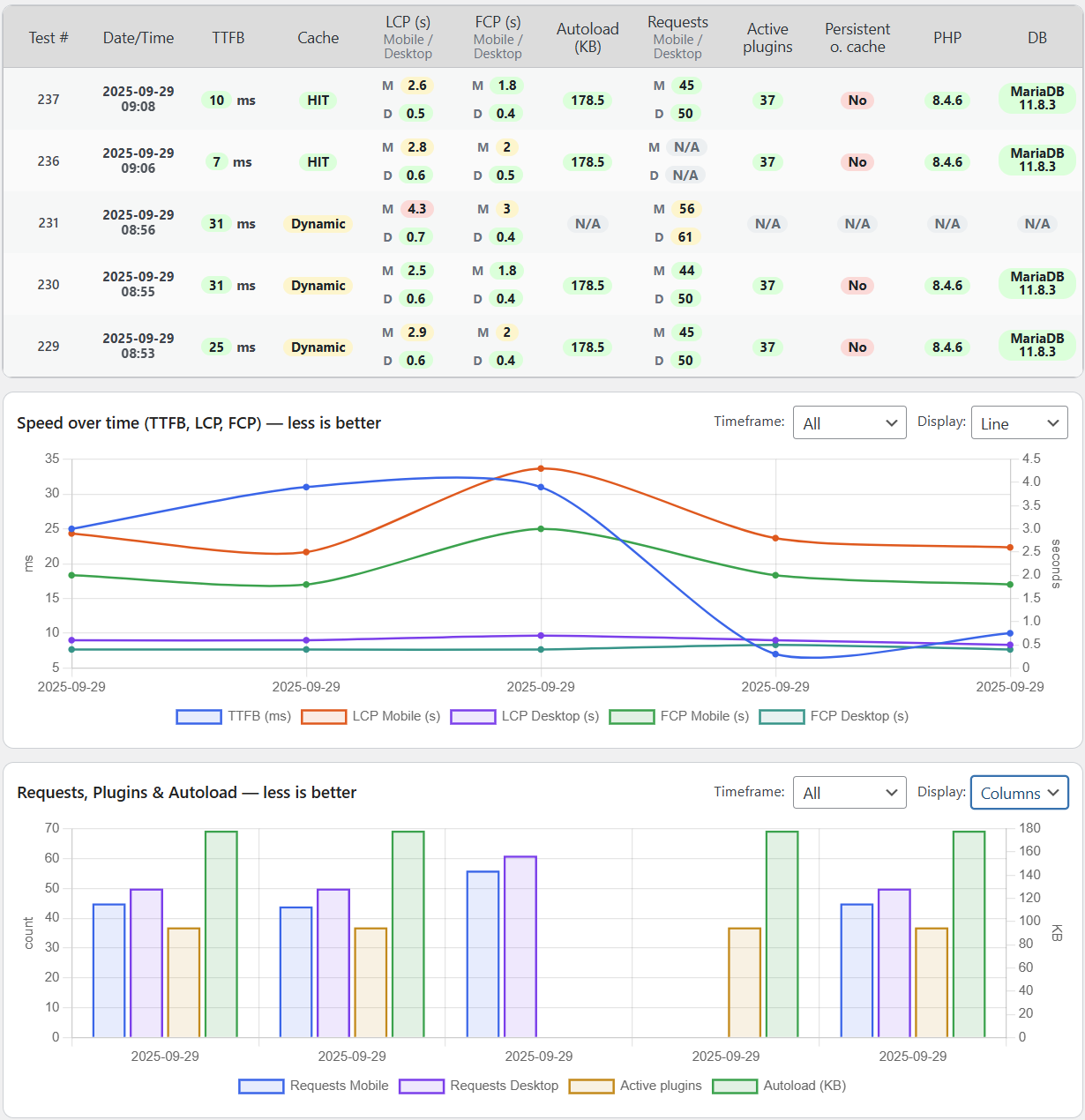
More about Speed Analyzer—Compare results
There is an A/B test direct comparison available, where you can easily show differences between two tests (from the same URL) of your choosing.

Speed Analyzer includes a fully operational Schedule tests functionality, all for free. Now you may schedule a test at your convenience and, if you choose, receive a report by email.

As a WordPress speed optimization professional, my daily routine includes creating test reports for clients. Over the last six years, I’ve created over 100 reports annually (give or take a dozen).
This is not a hobby—it’s a full-time job, and many times over, I wish there were a WordPress speed-optimization plugin like Speed Analyzer. In its absence, I’ve decided to create one myself (with the help of AI).
Many web speed test tools are available; my favorites are Google PSI, KeyCDN, WPT, and GTmetrix (all covered in this article). However, they (separately) don’t paint a complete picture of a website’s speed. You need to run multiple tests on a few of them and check the browser console for response headers and other metrics to get a comprehensive picture of the website’s speed.
That takes time, and the whole dance becomes tedious sooner rather than later.
As a solution, I combined the best aspects of those tests into one WordPress speed optimization plugin—the Speed Analyzer was born. This comprehensive WordPress speed optimization plugin analyzes your WordPress website’s performance, compares results, and generates PDF reports.
Suppose you are interested in identifying speed-related bottlenecks, improving your WordPress website’s speed, or automating the production of speed reports in your agency. In that case, Speed Analyzer, with its powerful PDF reporting, is a tool you must try.
100% free · GPL-3.0 licensed · No account required
FAQ
Is the free version enough to test my website?
Yes, the free version of Speed Analyzer is perfectly suited to providing you with information and explanation of data related to your website speed. It has a limit of 10 daily tests, which is more than enough for most users.
If you intend to use it many times per day, you may need to upgrade to a paid plan, or you can simply wait 24 hours and do the additional tests then.
Why is there a daily limit?
Speed Analyzer uses two external APIs, and the more hits they get, the more expensive it becomes for us to keep it going. A generous daily limit is set for fair daily usage. Besides, if you use Speed Analyzer a lot, we recommend getting one of the premium plans and increasing your daily limit (with some other perks).
Why do some of the results vary from test to test?
TTFB may vary if your cache is “cold”, hit the test again and it will “warm up” and provide you with a better result.
LCP and FCP may vary the same as they do on the Google PSI test, as we use the same data.
Will my paid license work on the stage area?
A paid license saves your domain name (‘your-domain-name.com’), so if your stage website has that domain name (for example, ‘stage-your-domain-name.com’ or ‘your-domain-name-shop.com’), it will still work.
However, if it doesn’t contain the domain name (like ‘1234.cloudways-stage.com’) it will not work on a Pro plan (single domain only).
In that case you have an option to use the Business plan (2 licenses) or the Agency plan (100 licenses).
If you encounter any issues with your license, please get in touch with us, and we’ll fix it asap.
Can I analyze external URLs?
You can only do so with an Agency plan. However, you will not get all that Speed Analyzer has to offer. In the external URL scan, you can’t get the Autoloaded options size or the Persistent object cache info.
Can you optimize the speed of my WordPress website?
This is what we do. Please check our dedicated WordPress speed optimization service.
Generate PDF report button is not available?
You must Run Speed Audit first — the Generate PDF report button will reveal itself on the main test screen (plus additional button between modules 6 and 7, and another at the end) only after the tests have finished.