
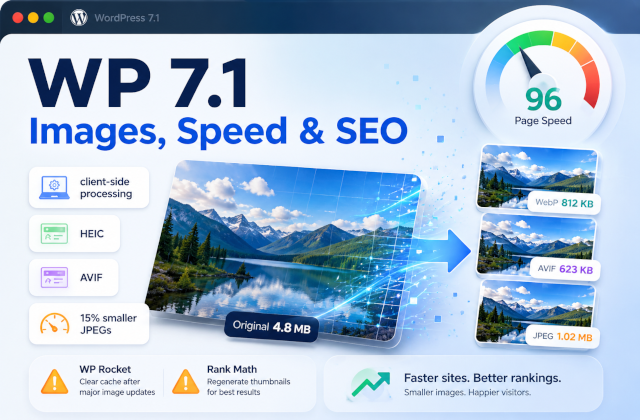

WordPress 7.1 images are no longer entirely your server’s problem. With the WordPress 7.1 update, image compression, resizing, and thumbnail generation can happen directly inside the browser before the files reach your server. For WordPress image optimization and WordPress speed optimization, that is a much more interesting change than another new block with a nice button.
Your server may finally stop being asked to resize somebody’s 48-megapixel holiday photo while also serving a WooCommerce checkout page.
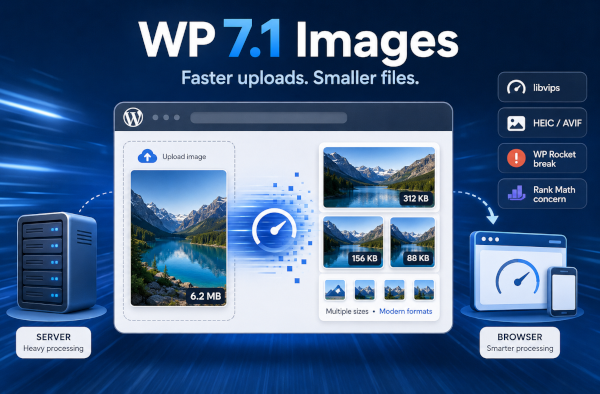
WordPress 7.1 “Mary Lou” introduces client-side media processing using a WebAssembly version of the libvips image-processing library. In supported browsers, WordPress can resize, compress, rotate, convert, and generate image sub-sizes locally, then upload the finished versions to the server. If the client-side process cannot complete, WordPress can fall back to its traditional server-side image pipeline.
Table of Contents
What actually changed with WordPress 7.1 images?
Previously, you uploaded the original image, and WordPress handed most of the dirty work to PHP, usually through GD or ImageMagick.
With WordPress 7.1, much of that work can happen before the server receives the finished image sizes.
The practical difference looks like this:
Before WordPress 7.1Large image → server → PHP/GD/Imagick → resize + thumbnails → storage
WordPress 7.1Large image → browser/libvips → resize + compress + thumbnails → server → storage
That little rearrangement matters.
WordPress Core says the new libvips pipeline produces JPEG files roughly 15% smaller than GD or ImageMagick using MozJPEG-like encoding. It also removes many PHP memory-limit failures and reduces CPU and memory work on the web server.
It also natively handles AVIF, HEIC/HEIF, and HDR gain maps. That means the iPhone photo that previously required the correct server-side image libraries has a much better chance of simply working.
The WordPress 7.1 Image Pipeline
| Before WordPress 7.1 | WordPress 7.1 |
|---|---|
| Browser uploads gigantic original | Browser processes image first |
| PHP handles resizing | wasm-vips handles resizing |
| GD/Imagick generates thumbnails | Browser generates thumbnails |
| Server CPU + RAM used | User device does much of the work |
| Format support depends on host | Consistent modern-format support |
| PHP memory errors possible | Automatic server fallback available |
WordPress 7.1 doesn’t eliminate image optimization. It moves a significant part of image creation closer to the person uploading the image.
EWWW Image Optimizer found the interesting part too
Shane Bishop from EWWW Image Optimizer summarized the change nicely:
“The various thumbnails generated by WP are now generated directly in the browser, on your computer/device instead of on the server.”
EWWW’s testing was generally positive, but it also found some edge cases. Indexed/palette PNG files could become significantly larger when resized, animated GIF thumbnails could lose EWWW’s animation-preservation behavior, and client-side processing bypasses some server-specific image hooks. EWWW 8.7.6 consequently added both WordPress 7.1 compatibility fixes and an option to disable client-side processing.
That is an important detail: new does not automatically mean better for every image workflow.
Does WordPress 7.1 make image optimization plugins unnecessary?
No.
WordPress has become better at creating web-ready image variants. That is not the same thing as having a complete image-performance strategy.
You can still have a beautifully compressed 80 KB image and serve it at the wrong dimensions. You can still lazy-load your LCP image and make PageSpeed Insights unhappy. You can still serve ten gallery images before anybody scrolls near them. And WordPress 7.1 does not suddenly optimize your entire existing Media Library, provide adaptive CDN delivery, or make every theme choose the correct responsive image.
This is why I still consider images one of the first places to look during a WordPress speed optimization project. The browser does not care that your optimization plugin dashboard has five green checkmarks. It cares what it actually has to download.
ShortPixel makes a related point in its article about image optimization and AI search:
“Your images aren’t just decoration. They’re content that AI systems evaluate, interpret, and sometimes feature in their responses.”
That is relevant for SEO, AIO, and GEO as search becomes increasingly multimodal. Useful filenames, accurate ALT text, contextual relevance, structured data, sensible dimensions and fast delivery increasingly belong to the same conversation.
WordPress 7.1 also broke WP Rocket — badly
Another reason not to treat major WordPress updates as a ceremonial click of the blue Update button.
Shortly after the WordPress 7.1 rollout, some websites running WP Rocket started returning fatal errors. The problem involved WP Rocket’s Cloudflare compatibility code calling PHP’s substr() function on a callback identifier that WordPress 7.1 could now expose as an integer under certain conditions.
The result was not a slightly worse PageSpeed score.
The result was a dead website.
WP Rocket estimates that roughly 27% of its sites were potentially at risk and about 10% were actually affected. Version 3.23.2.2 shipped as the fix. WP Rocket’s own post-mortem was refreshingly direct:
“This was our fault, because we didn’t take action on time.”
What makes it worse is that they had ample time to fix this, as that exact error was reported to them well in advance. It somehow slipped through.
That is also why I recommend testing major WordPress updates on staging first, particularly when the site relies on performance plugins, builders, and custom integrations.
And then Rank Math gave us an AI permissions lesson
Naturally, errors are not reserved for WP Media alone — Rank Math SEO 1.0.277 introduced a new Support Agent and new abilities allowing AI assistants to interact with Rank Math settings.
More interestingly, when a user opened its Help & Support panel, the plugin created a WordPress Application Password so the agent could access site information. Rank Math says the credentials were encrypted, not stored by Rank Math, inherited the current user’s permissions, and were used by a read-only agent.
Still, users were not being told clearly enough that credentials were being generated.
Rank Math subsequently released 1.0.277.2 on August 31 and temporarily removed the Support Agent, saying it wanted to provide greater transparency and explicit consent before site access is granted.
I would describe this as a serious security and access-transparency concern, not a confirmed exploitable security vulnerability. There is an important difference.
AI agents interacting with WordPress will become normal. Quietly creating credentials for them should not.
So, should you update to WordPress 7.1?
The image changes in WordPress 7.1 are genuinely useful. Moving expensive image processing into the browser reduces server work, improves format support, and can produce smaller generated images. For many sites, it is a free performance improvement hiding inside a normal Core update.
But after updating, test actual image uploads, generated thumbnails, your image optimization plugin, the front end, and your caching stack.
WordPress 7.1 has made images smarter.
It has not made testing optional.
FAQ
Does WordPress 7.1 automatically optimize images?
WordPress 7.1 improves image compression, resizing, and thumbnail generation by processing supported uploads in the browser with libvips. Dedicated optimization plugins can still provide additional compression, CDN delivery, bulk optimization, and other controls.
Are WordPress 7.1 images smaller?
WordPress Core reports that JPEG images generated by its new libvips pipeline can be around 15% smaller than equivalents produced using GD or ImageMagick.
Does WordPress 7.1 support HEIC images?
Yes. WordPress 7.1 adds client-side support for HEIC/HEIF processing on supported platforms, allowing many iPhone images to be converted before upload without depending entirely on server-side HEIC support.
Did WordPress 7.1 break WP Rocket?
A WordPress 7.1 compatibility issue could trigger fatal errors on some sites using WP Rocket and certain other plugins. WP Rocket released version 3.23.2.2 to address and fix the issue.
Founder of WPservice.pro
Dalibor is a master of web excellence. With a Bachelor of Science (BS) in civil engineering, Dalibor had an unusual road to end up in IT. Cultivating deep expertise in WordPress website speed optimization, meticulous maintenance, development, and search engine optimization (SEO) while preserving his engineering approach to problem-solving.
Having completed over 90 projects and achieved a top-rated status (on Upwork) in the highly competitive digital niche, Dalibor is a proper authority on enhancing performance and ensuring websites look exceptional and perform flawlessly.
Dalibor is a published writer and an avid learner who continually explores and embraces the latest digital trends. With a commitment to quality and a keen eye for detail, Dalibor is your trusted guide to achieving web success.