


Three CDN subscriptions. Only two can bring the HTML closer. FlyingCDN vs RocketCDN vs Cloudflare APO is therefore a comparison of delivery layers before it becomes a race between stopwatches.
This article concerns the initial HTML document’s Time to First Byte (TTFB), rather than total page loading. Product facts and public prices were checked on October 16, 2026. This is a documentation-based comparison with a testing method, not an invented three-product benchmark. For the optimization plugins themselves, see my broader FlyingPress vs WP Rocket comparison.
FlyingCDN vs RocketCDN vs Cloudflare APO: the short answer
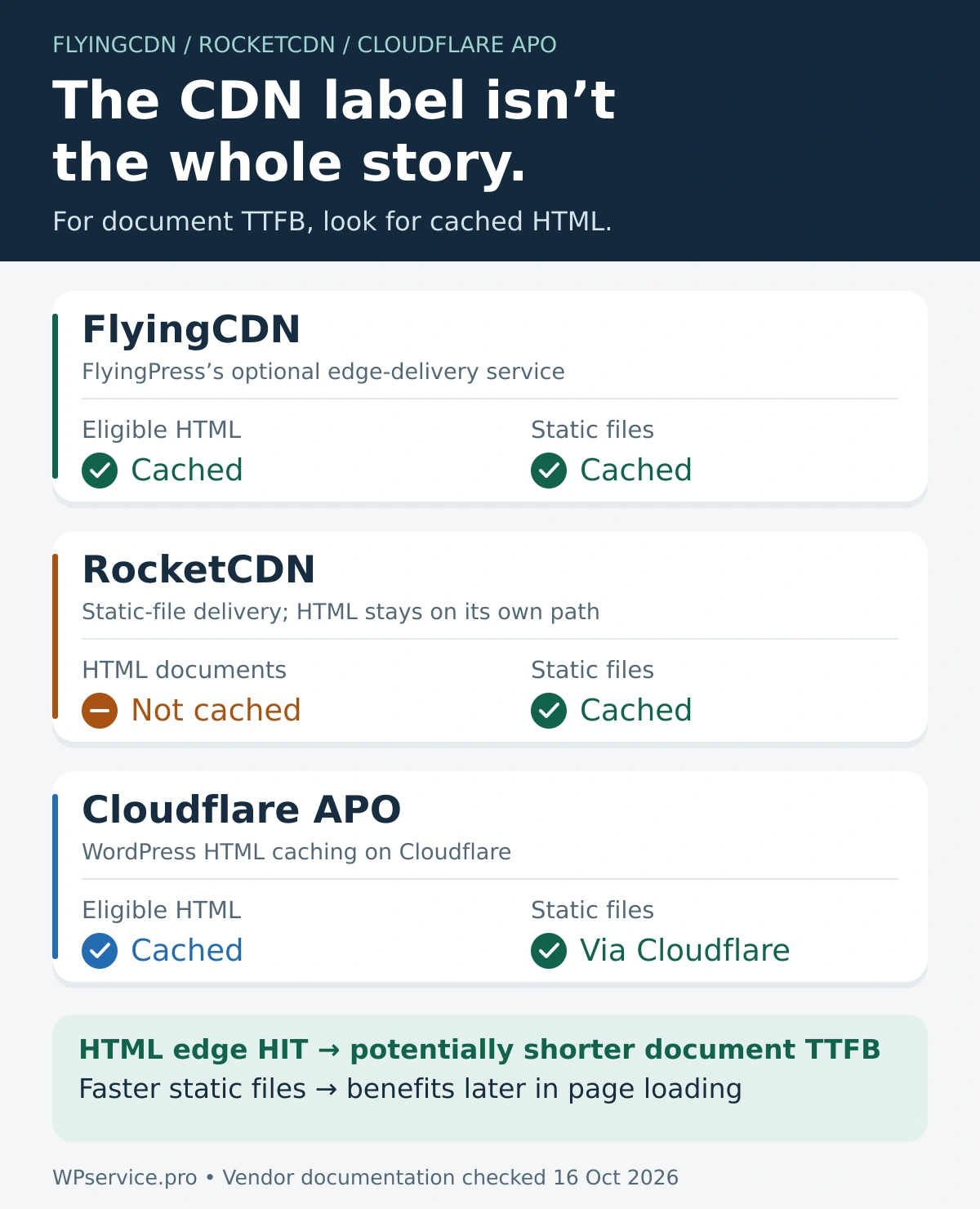
FlyingCDN and Cloudflare APO can reduce document TTFB by serving eligible cached HTML from an edge location. RocketCDN currently caches static files, not HTML, so it does not directly shorten the document’s wait through HTML edge caching. RocketCDN can still improve asset delivery. A cache MISS, BYPASS, or personalized request can still reach the origin with FlyingCDN or APO. Choose the layer your site needs, then verify the main document’s response headers and timings. A CDN badge alone proves very little.
In this article
FlyingCDN vs RocketCDN vs Cloudflare APO: the short answer
What must a CDN cache to improve document TTFB?
Current comparison: HTML, assets, requirements, and price
FlyingCDN: HTML and assets from the edge
RocketCDN: useful CDN, wrong layer for document TTFB
Cloudflare APO: WordPress HTML edge caching
HIT, MISS, BYPASS, and the cache-hit ratio
WooCommerce, memberships, and logged-in pages
How to test TTFB without testing three different things
What must a CDN cache to improve document TTFB?
TTFB is the time until the first response byte arrives. An origin page cache stores generated HTML at your hosting server, avoiding repeated WordPress/PHP work. A static CDN delivers files such as CSS, JavaScript, images, and fonts. An HTML edge cache stores eligible page HTML on the delivery network, closer to visitors.
A faster stylesheet cannot retroactively shorten the HTML response that led the browser to request it. Static delivery can improve later loading, while the document still waits for a distant origin. Conversely, an origin page-cache HIT can be quick without being an edge-cache HIT. These distinctions explain why WordPress can remain slow after installing a caching plugin.
web.dev’s TTFB guidance includes DNS, connection/TLS, redirects, and the request-to-response interval. Its rough target is 0.8 seconds or less; TTFB is not a Core Web Vital. A shorter TTFB helps HTML arrive earlier, but does not promise good LCP or responsive interactions.
Three request paths
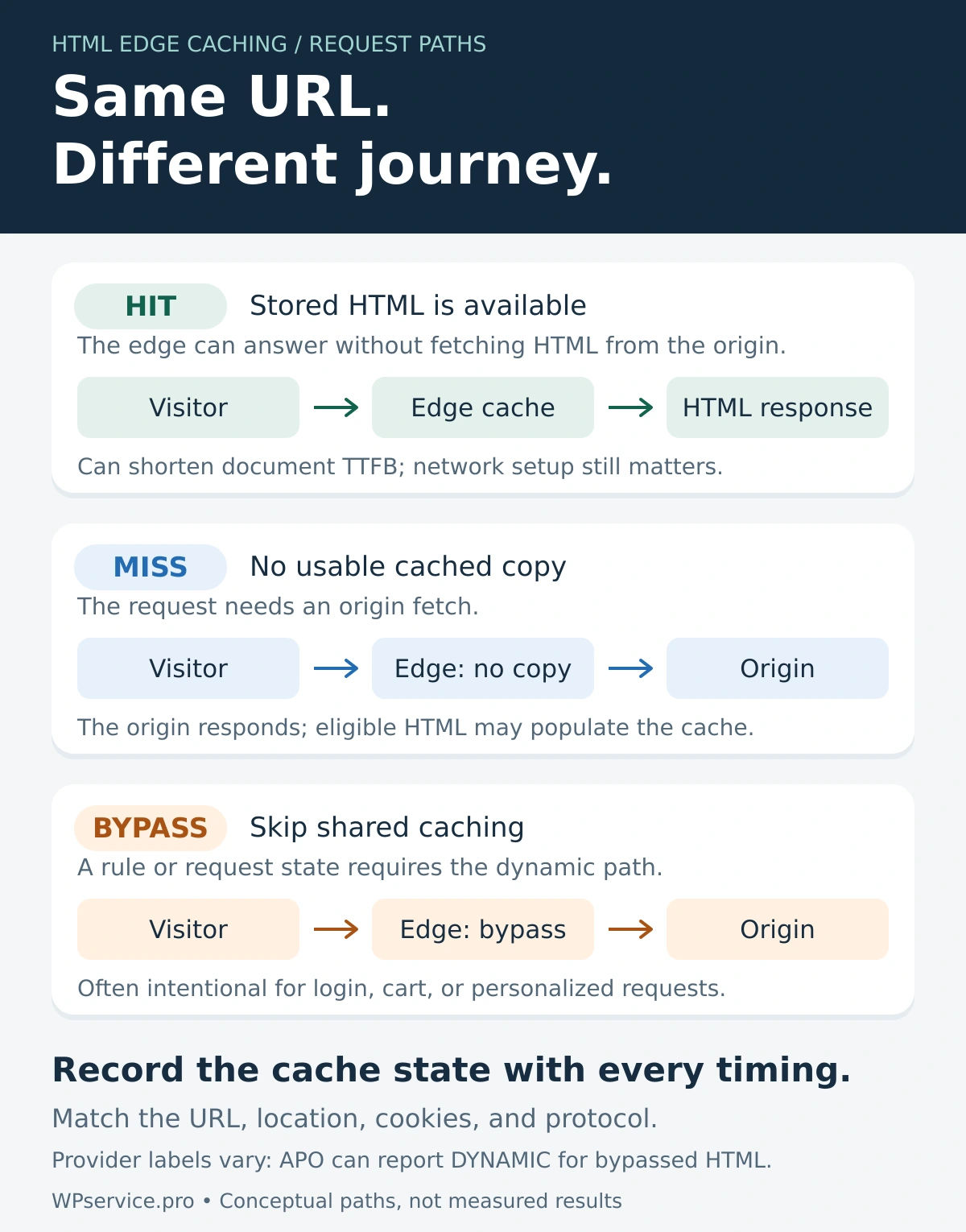
HTML HIT: Visitor → edge → cached HTML → visitor
HTML MISS / BYPASS: Visitor → edge → origin → HTML → visitor
Separate asset request: Visitor → static CDN → CSS, JavaScript, image, or font
FlyingCDN and APO can take the HTML-HIT path. RocketCDN handles static-file delivery; the HTML document still needs its separate origin path.
The HTML response and subsequent static-file responses are separate requests. All labels are editable text.
Current comparison: HTML, assets, requirements, and price
| Layer / requirement | FlyingCDN | RocketCDN | Cloudflare APO |
|---|---|---|---|
| HTML edge cache | Yes, eligible pages | No | Yes, eligible pages |
| Static delivery | Yes | Yes | Yes, through Cloudflare |
| Direct document TTFB benefit | Possible on HTML HIT | No HTML edge HIT | Possible on HTML HIT |
| WordPress prerequisite | FlyingPress + add-on | WP Rocket integration or separate setup | Official Cloudflare plugin; connected account |
| Check the document | flyingcdn-cache: HIT | No RocketCDN HTML-HIT header | CF-Cache-Status + cf-apo-via; cf-edge-cache context |
| Price snapshot: Oct 16, 2026 | $10/month/domain; 100 GB; +$5/100 GB | $7.99/month or $79/year/domain for WP Rocket subscribers; VAT extra | $5/month on Free; included with Pro/Business/Enterprise |
| Dynamic requests | Exclusions still matter | HTML remains on origin path | Eligibility and cookie/path bypasses |
| Best fit | Integrated FlyingPress edge option | Convenient static delivery | WordPress HTML caching in Cloudflare |
Sources: FlyingCDN features, FlyingCDN billing, RocketCDN scope and subscriber pricing, APO behavior, and Cloudflare plan pricing.
Prices below are USD snapshots checked October 16, 2026. FlyingPress, WP Rocket, and paid Cloudflare plan subscriptions are separate costs where applicable. Compare total stack costs and traffic scope before treating the monthly figures as equivalent offers.
FlyingCDN: HTML and assets from the edge
FlyingCDN is an optional FlyingPress add-on, built on Cloudflare Enterprise, with full-page caching, static delivery, and image optimization. A nearby HTML HIT can avoid an origin round trip. A MISS still needs to fetch content; an excluded request still needs its dynamic path.
FlyingCDN pricing is $10 per domain monthly for 100 GB, plus $5 per additional 100 GB. Both cached delivery and traffic forwarded to the origin count. A store with many bypassed requests should include that traffic in its estimate.
The verification guide tells you to inspect the main request for flyingcdn-cache: HIT. Check the document, not merely an image. Then measure from visitor regions that matter to the business.
FlyingCDN is not FlyingPress’s direct Cloudflare integration
FlyingPress’s Cloudflare integration uses your Cloudflare account, including Free, to add HTML caching and synchronize exclusions and purges. It is a separate option from FlyingCDN. Its setup instructions explicitly say to disable APO before enabling that integration.
That distinction matters when comparing bills and assigning cache ownership. Use my best FlyingPress settings guide for plugin context, then follow the current integration documentation for the chosen edge layer. More overlapping switches do not make a clearer setup.
RocketCDN: useful CDN, wrong layer for document TTFB
The RocketCDN presales FAQ explicitly excludes HTML. It lists Free coverage for up to three key pages and Pro coverage across the site. Here, “pages” describes delivery scope; it does not turn RocketCDN into an HTML cache.
For WP Rocket subscribers, that FAQ lists $7.99 per domain monthly or $79 yearly, excluding VAT. The standalone RocketCDN site displays a different offer; check the applicable checkout. Its static delivery can help images, scripts, styles, and fonts, potentially benefiting later loading and LCP.
WP Rocket’s origin page cache is separate. If a page becomes faster after enabling several features together, isolate the changes before assigning credit. My WP Rocket review and settings guide covers that plugin layer. Measure the document and its assets separately.
Cloudflare APO: WordPress HTML edge caching
Cloudflare APO caches eligible HTML and updates cached content through its WordPress integration. Cloudflare’s pricing page lists APO at $5 monthly on Free and included with Pro, Business, and Enterprise. This is the APO charge, not the total price of those plans.
The official setup uses Cloudflare’s WordPress plugin and authenticated account connection. Its plugin does not support WordPress multisite. Treat multisite as a separate suitability check before purchasing or copying a single-site recipe.
For a warm HTML response, Cloudflare’s verification guide checks CF-Cache-Status: HIT, cf-apo-via, and cf-edge-cache. The guide shows both cache and tcache examples for cf-apo-via; do not make one literal value your entire diagnosis. cf-edge-cache: cache,platform=wordpress signals the plugin’s caching permission, not by itself an edge HIT.
Cloudflare lists FlyingPress and WP Rocket 3.8.6+ as compatible. Compatibility still needs configuration checks. WP Rocket’s APO documentation explains purge synchronization through the official Cloudflare plugin, and warns about dynamic/mandatory cookies and custom query-string caching. Its preload caveat also explains why cf-edge-cache can be absent on preloaded pages.
Most importantly, adding an arbitrary cookie to WP Rocket’s Never Cache Cookies does not necessarily create the same APO exclusion. Verify both layers. For FlyingPress’s own Cloudflare HTML-caching integration, follow its instruction to disable APO. Choose a clear owner for HTML caching and purging.
HIT, MISS, BYPASS, and the cache-hit ratio
A HIT means the relevant cache served a stored response. A MISS means that cache had no usable copy and needed to fetch one. BYPASS means caching was skipped by policy or request conditions. Providers may label ineligible responses differently: APO documents DYNAMIC for requests that fail its HTML eligibility rules.
A cold edge, a content purge, a session cookie, or an unsupported query string can change the result. Do not assume a second request reaches the same edge, or that every URL can become a HIT. Read the actual response state.
The cache-hit ratio is HITs divided by requests in a clearly stated set. For this decision, track eligible public HTML requests separately from assets and dynamic actions. An impressive asset hit ratio says little about document coverage. Report bypassed traffic too, so a high eligible ratio does not hide a mostly dynamic audience.
A single warm test answers whether that request could benefit. A representative traffic sample answers how often visitors benefit. I want both. The awkward run is still a customer.
WooCommerce, memberships, and logged-in pages
Public product and category pages may be eligible for shared HTML caching. Cart, Checkout, My Account, sessions, and personalized views need exclusions or explicitly supported dynamic handling. WooCommerce’s caching guidance and FlyingPress’s store guidance are starting points, not substitutes for testing your store.
An HTML HIT on a product page establishes nothing about payment, shipping, tax, Store API, AJAX, or account requests. Measure those operations separately. Membership access, location pricing, and custom cookies deserve the same care: a fast wrong response is still wrong.
My FlyingPress vs WP Rocket for WooCommerce comparison covers plugin choices. The explanation of why WooCommerce cart and checkout stay slow after caching covers the uncached work an edge HIT cannot remove.
How to test TTFB without testing three different things
Use this protocol with a staging copy or an agreed test window. Changing CDN paths or DNS can change the environment; document those changes rather than presenting the comparison as a perfectly isolated experiment.
1. Keep the same public URL, content, origin configuration, test location, HTTP protocol, and cookie/login state. Record necessary DNS or routing changes for each setup.
2. Record status, redirects, DNS, connection, TLS, TTFB, and cache headers for each request. Use the final document URL to avoid accidentally timing a redirect as the page.
3. Separate verified cold/MISS conditions from warm/HIT conditions. Use a targeted purge only when authorized; random query strings can create a bypass instead of a cold cache.
4. Send Accept: text/html when checking APO with cURL. Avoid a browser hard reload’s no-cache request headers when testing ordinary cache eligibility.
5. Keep at least three comparable requests per condition and their median. Three is my practical starting point, not a Google rule. Repeat from relevant visitor regions.
6. Retain individual runs and their headers. Test public HTML, static files, and dynamic actions as separate groups.
curl -sS -o /dev/null -D - \
  -H 'Accept: text/html' \
  -w 'dns=%{time_namelookup} connect=%{time_connect} tls=%{time_appconnect} ttfb=%{time_starttransfer} total=%{time_total}\n' \
  'https://example.com/'
This command makes one GET request and prints that request’s response headers and cumulative timings in seconds. It deliberately does not follow redirects: if the status is 301/302, record the redirect and repeat against the final URL. connect and tls are elapsed milestones, not independent durations to add together. New cURL processes also differ from a browser reusing an existing connection. See the cURL timing documentation.
What happens before the first byte?
1 · DNS — locate the host.
2 · Connection / TLS — establish the connection when needed.
3 · Request travel — reach the serving edge or origin.
4 · Edge or origin wait — an HTML HIT can avoid the origin fetch and generation path.
5 · First response byte — arrives back at the client; this is the measured endpoint.
Conceptual sequence, not a measured or proportionally scaled timeline. Redirects can add work; reused connections can skip setup. Edge caching can shorten the serving path, not erase every phase.
TTFB includes network setup and response delivery as well as waiting. No milliseconds are implied.
| Configuration | Condition / actual headers | Runs + median TTFB | Result |
|---|---|---|---|
| FlyingCDN | Cold/MISS — not verified | Not measured | Inconclusive |
| FlyingCDN | Warm/HIT — not verified | Not measured | Inconclusive |
| RocketCDN enabled | HTML origin path — not verified | Not measured | Inconclusive |
| Cloudflare APO | Cold/MISS — not verified | Not measured | Inconclusive |
| Cloudflare APO | Warm/HIT — not verified | Not measured | Inconclusive |
Worksheet only. No product timing was measured. Add bypass/dynamic runs and the underlying run log before drawing a conclusion.
For each worksheet row, retain a separate run log containing the URL, UTC timestamp, region, protocol, cookie state, response headers, individual timings, and median. Leave the verdict inconclusive until conditions are comparable. RocketCDN’s HTML row measures the origin path while RocketCDN is enabled; it cannot produce a RocketCDN HTML HIT.
My WordPress performance audit checklist helps keep the wider diagnosis organized. Speed Analyzer can support bottleneck investigation; it does not replace per-request headers or establish a controlled CDN benchmark.
Why can TTFB stay slow beside a HIT header?
First confirm the HIT belongs to the HTML document and the cache layer you intended to test. Then inspect redirects, connection setup, client-to-edge travel, and the measurement tool. If Early Hints are involved, check whether the reported first byte describes an interim response or the final response. A header is evidence of cache state, not proof of short end-to-end latency.
Which option fits which WordPress site?
| Your starting point | What I would evaluate |
|---|---|
| FlyingPress; integrated Enterprise delivery wanted | FlyingCDN, including traffic costs and bypass coverage. |
| Cloudflare; WordPress HTML caching wanted | APO, including plugin, plan, and compatibility requirements. |
| WP Rocket; simple static delivery wanted | RocketCDN, judged on asset response times. |
| Mostly local audience; fast origin | Measure the gap before adding a paid layer. |
| Store, membership, or personalization | Correct exclusions and uncached journey performance first. |
For a slow backend, investigate hosting capacity, PHP, database queries, persistent object caching, and remote service calls. An edge HIT can spare the origin some public work; it cannot repair every request that still reaches WordPress. Fix the request visitors actually wait for.
Safe decision checklist
Name one owner for HTML edge-cache rules and purge synchronization.
Verify anonymous, logged-in, cart/session, and personalized states.
Confirm document HIT headers and dynamic exclusions separately.
Edit a test page and verify fresh content across origin and edge layers.
Test article, service, product, account, and checkout journeys as applicable.
Record the prior settings and a clear rollback path.
Repeat comparable tests from relevant geographic locations.
My verdict
For reducing document TTFB through HTML edge hits, I would evaluate FlyingCDN and APO against the site’s existing stack, exclusions, purge workflow, traffic, and cost. RocketCDN belongs in a static-delivery decision. I would not buy it expecting HTML edge caching.
I am not naming a universal speed winner without comparable measurements. On a local audience with a fast origin, the improvement may be small. On a global content site, eligible HTML coverage may matter much more. On a personalized store, the uncached buying journey still needs to work quickly and correctly.
Three CDN subscriptions, then, but only two can bring the HTML closer. Pick the right layer before picking the prettiest timing. If you need help separating those layers, my WordPress speed optimization service starts with the site’s actual bottlenecks.
Frequently asked questions
Which is best for WordPress TTFB: FlyingCDN, RocketCDN, or Cloudflare APO?
FlyingCDN and APO can serve eligible cached HTML at the edge, so they address document TTFB directly through that layer. RocketCDN serves static files. Between FlyingCDN and APO, choose using your stack, exclusions, budget, purge workflow, and comparable measurements. This article does not establish a measured speed winner.
Does RocketCDN cache WordPress HTML?
No. RocketCDN’s current documentation excludes HTML. Its static-file delivery can still help later loading. A faster HTML response with WP Rocket enabled may come from WP Rocket’s origin cache; inspect the document separately before assigning the improvement to RocketCDN or calling it an HTML edge HIT.
Is FlyingCDN the same as FlyingPress’s Cloudflare integration?
No. FlyingCDN is an optional paid FlyingPress add-on based on Cloudflare Enterprise. FlyingPress’s direct Cloudflare integration uses your own account, including Free, for HTML caching and purge synchronization. These are separate configurations with different scope. FlyingPress instructs users to disable APO before enabling its direct Cloudflare HTML-caching integration.
Can I use Cloudflare APO with WP Rocket or FlyingPress?
Cloudflare lists both as compatible, including WP Rocket 3.8.6 and later. That does not validate every custom cookie or query-string setup. WP Rocket documents purge integration and limitations. For FlyingPress, distinguish ordinary plugin use with APO from FlyingPress’s separate Cloudflare HTML-caching integration, whose guide says to disable APO.
Why does TTFB stay slow when the CDN says HIT?
The HIT might belong to an asset rather than the HTML document. Even a document HIT leaves connection setup, redirects, and client-to-edge latency to consider. Associate headers and timings with the same request, confirm the measured response, and inspect the waterfall. Cache state alone does not measure the entire journey.
Should WooCommerce Cart and Checkout be cached at the edge?
Keep personalized Cart and Checkout HTML outside a shared edge cache unless a supported architecture explicitly handles those states safely. Verify account pages, session cookies, prices, stock, and payment behavior too. Caching public product pages does not establish that checkout, shipping calculations, or authenticated requests are faster or safe to cache.
Is TTFB a Core Web Vital?
No. TTFB is a diagnostic timing that influences when later loading can begin. web.dev gives 0.8 seconds or less as a rough guide. Assess it alongside LCP, INP, and CLS, and check the measurement context. A low TTFB cannot compensate for heavy rendering work or broken interactions after HTML arrives.
Founder of WPservice.pro
Dalibor is a master of web excellence. With a Bachelor of Science (BS) in civil engineering, Dalibor had an unusual road to end up in IT. Cultivating deep expertise in WordPress website speed optimization, meticulous maintenance, development, and search engine optimization (SEO) while preserving his engineering approach to problem-solving.
Having completed over 90 projects and achieved a top-rated status (on Upwork) in the highly competitive digital niche, Dalibor is a proper authority on enhancing performance and ensuring websites look exceptional and perform flawlessly.
Dalibor is a published writer and an avid learner who continually explores and embraces the latest digital trends. With a commitment to quality and a keen eye for detail, Dalibor is your trusted guide to achieving web success.
Founder of WPservice.pro
Dalibor is a master of web excellence. With a Bachelor of Science (BS) in civil engineering, Dalibor had an unusual road to end up in IT. Cultivating deep expertise in WordPress website speed optimization, meticulous maintenance, development, and search engine optimization (SEO) while preserving his engineering approach to problem-solving.
Having completed over 90 projects and achieved a top-rated status (on Upwork) in the highly competitive digital niche, Dalibor is a proper authority on enhancing performance and ensuring websites look exceptional and perform flawlessly.
Dalibor is a published writer and an avid learner who continually explores and embraces the latest digital trends. With a commitment to quality and a keen eye for detail, Dalibor is your trusted guide to achieving web success.